
doc-views
doc-views
Read the document, not a download dialog.
Preview Word, PDF, PowerPoint and Excel documents without leaving the page.
Word DOCX<figure class="document-block" aria-label="Word DOCX" data-edgepress-document data-document-src="/documents/doc-views/sample-document-medium.docx" data-document-title="Word DOCX" data-document-format="docx"><div data-document-mount><p>Loading document…</p></div><noscript><p>The document could not be previewed. Check its URL, access and CORS.</p></noscript></figure>
Word DOC<figure class="document-block" aria-label="Word DOC" data-edgepress-document data-document-src="/documents/doc-views/sample-document-medium.doc" data-document-title="Word DOC" data-document-format="doc"><div data-document-mount><p>Loading document…</p></div><noscript><p>The document could not be previewed. Check its URL, access and CORS.</p></noscript></figure>
PDF<figure class="document-block" aria-label="PDF" data-edgepress-document data-document-src="/documents/doc-views/sample-document-5-pages.pdf" data-document-title="PDF" data-document-format="pdf"><div data-document-mount><p>Loading document…</p></div><noscript><p>The document could not be previewed. Check its URL, access and CORS.</p></noscript></figure>
PPT<figure class="document-block" aria-label="PPT" data-edgepress-document data-document-src="/documents/doc-views/sample-document.ppt" data-document-title="PPT" data-document-format="ppt"><div data-document-mount><p>Loading document…</p></div><noscript><p>The document could not be previewed. Check its URL, access and CORS.</p></noscript></figure>
PPTX<figure class="document-block" aria-label="PPTX" data-edgepress-document data-document-src="/documents/doc-views/sample-presentation-10-slides.pptx" data-document-title="PPTX" data-document-format="pptx"><div data-document-mount><p>Loading document…</p></div><noscript><p>The document could not be previewed. Check its URL, access and CORS.</p></noscript></figure>
Excel XLSX<figure class="document-block" aria-label="Excel XLSX" data-edgepress-document data-document-src="/documents/doc-views/sample-spreadsheet-100-rows.xlsx" data-document-title="Excel XLSX" data-document-format="xlsx"><div data-document-mount><p>Loading document…</p></div><noscript><p>The document could not be previewed. Check its URL, access and CORS.</p></noscript></figure>
Excel XLS<figure class="document-block" aria-label="Excel XLS" data-edgepress-document data-document-src="/documents/doc-views/sample-spreadsheet-100-rows.xls" data-document-title="Excel XLS" data-document-format="xls"><div data-document-mount><p>Loading document…</p></div><noscript><p>The document could not be previewed. Check its URL, access and CORS.</p></noscript></figure>
doc-views<div class="project-demo" data-project-demo data-animation="/images/previews/76ca81ddfcd87c1c9779f7f7096f1a513b48c8defc21c5efaec903ddba96f23d.mp4" data-play="Play demo" data-resume="Continue demo" data-pause="Pause demo" data-replay="Replay demo" data-loading="Loading demo…" data-error="The walkthrough could not load. Please try again."><div class="project-demo-media"><img src="/images/responsive/d39bc07202babfaf4dee0b849ee867c95b4b784a590533678984aab3c5d9d1d4.webp" alt="doc-views" loading="lazy" decoding="async" data-original="/images/previews/doc-views-en.147df87fb0dc2c61.webp" srcset="/images/responsive/d39bc07202babfaf4dee0b849ee867c95b4b784a590533678984aab3c5d9d1d4.webp 400w, /images/responsive/9962e4df78dc2c7ee8be29db6c131fcc7cb74a2b5e1b2bb840f3eb9b86551f21.webp 800w, /images/responsive/663c7fa683386cd6d44c87f086b9378dc19fa857cf150ec4054b8d259ae352ed.webp 1200w" sizes="(max-width: 620px) calc(100vw - 32px), (max-width: 900px) calc((100vw - 72px) / 2), 560px" width="400" height="250"><video muted playsinline preload="none" hidden aria-label="Watch the document preview walkthrough"></video></div><button type="button" data-demo-toggle aria-pressed="false" aria-label="Play demo: Watch the document preview walkthrough">Play demo</button><input name="edgepress-demo-seek-1" class="project-demo-seek" data-demo-seek type="range" min="0" max="1" value="0" step="0.1" disabled aria-label="Demo progress: Watch the document preview walkthrough"><span class="project-demo-time" data-demo-time>0:00 / 0:00</span><span class="project-demo-status" role="status"></span></div>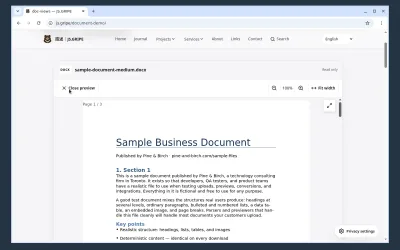
Watch the document preview walkthrough
Supplied documents: use in-document workspace and zoom icons for Word DOC/DOCX, read eight continuous PDF pages, inspect PPT/PPTX slides, and navigate Excel XLS/XLSX cells and worksheet tabs. The Summary demonstration includes calculated results, column dragging, Fill viewport and restoring source widths. Recorded in isolated Chromium; click to play.
!document[Example report](/documents/report.docx)
[
  {
    "columns": 1,
    "cells": [
      [
        {
          "type": "document",
          "title": "Report",
          "src": "/documents/report.pdf"
        },
        {
          "type": "media-viewer",
          "title": "Photos and video",
          "items": [
            {
              "type": "image",
              "src": "/images/photo.webp",
              "originalSrc": "/images/photo-original.webp",
              "alt": "Detail of the project interface"
            },
            {
              "type": "video",
              "src": "/videos/walkthrough.mp4",
              "poster": "/images/poster.webp",
              "label": "Project walkthrough",
              "captions": "/videos/walkthrough.en.vtt",
              "captionLanguage": "en"
            }
          ]
        }
      ]
    ]
  }
]